Wednesday, November 18, 2009

ABC Tracer: First Step in Making My Girl a Genius

As previously mentioned Wormie has become extremely interested in reading her books. So much so that she will pass watching TV or a movie after dinner so she can pour over her library books. After the success of the iPhone kid book app i figured i would try something more educational. My first experiment with educational flash cards didn't go so well. I'm giving that app some time before writing the review but it left a bad taste in my mouth.

My method for picking my apps for review is not very complex. I usually use the app store on the phone and will try a mix of paid and free versions to keep it balanced. I found the ABC Tracer in the Education channel in the iPhone store. My assumption there is that the best selling or most popular will be the versions that Apple puts at the top of the list. It's not a complex equation but I figure its worthwhile to work through the top apps first before digging down into the weeds.

So... i found ABC Tracer to figure out the basics before handing over to Wormie. This apps got everything for type A parents.
  • Flashcards? CHECK!
  • Phonics? CHECK?
  • Freestyle drawing to express your innner Picasso? DOUBLE CHECK!
The basic gist is that you can trace letters (upper case/lower case) and numbers in order to practice you writing skills. There are other little features like you can change the color of your ink and sound features (phonics i guess) like touching an object associated with your letter, which will then make the appropriate sound. Trace an A, touch the alligator, alligator roars... Wormie nailed it.

Like i said last week the iPhone book was in Wormies top spot, until she found ABC Tracer. I showed her how to start the app and she started cranking away on the tracings. I thought that i would have to show her how to work the menu but she was comfortable navigating all on her own. She even discovered some features i had missed, like a free drawing component that was probably designed for letters, but she used for pictures. Wormie went through each letter and number all on her own and would then go back to the beginning to start over.

The look and feel reminded me of a Fisher Price toy a la 1983, but the functionality is so strong, and Wormie was so engaged that I can forgive the lack luster aesthetics. Aside from dated artwork the only other criticism i have is that the app is trying to teach a "right" and "wrong" way to write a letter. I'm sure there is some theory and method behind this but for hte life of me i couldn't figure it out or see a way to explain the "correct" way to write a letter to Wormie. Perhaps I am just a roadblock on her way to a James Joycean understanding of the printed word, but I think she will be just as smart if i don't let her know that the red lines in her tracing means she did something wrong. Regardless this was not a blocker for using the application and Wormie has continued to bang the heck out of the ABC Tracer. I would highly recommend this to parents whose children are just getting into reading and letters.

Age Range: 4.5+
Difficulty: 4/5 (5 being easy)
Look & Feel :1/5 (5 being cool)
Parent Helper: 5/5 (5 being helpful)

Price:$1.99

Sunday, November 15, 2009

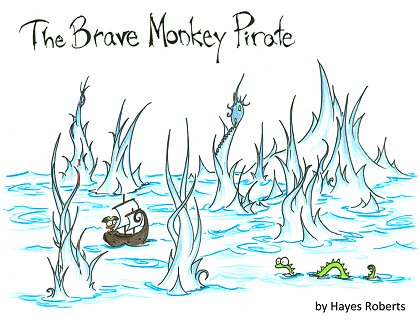
iStoryTime: The Brave Monkey Pirate - Quirky, Quick - PERFECT!

I saw a post not long ago on Twitter from App Develop @iStorytime promoting their kids story application. I thought it was a great idea and posted something about it to @gabbaphone twitter account. @iStoryTime wrote me back and gave me a free promo code to check out one of their story apps. I felt a little weird reviewing a free game, i'm all about the journalistic impartiality don't you know, so I went ahead and bought one for $1.99. I went for 'The Brave Monkey Pirate" based on the funny title and cute art.

I checked it out myself before handing it over to Wormie and there were some controls for audio (ie. do you want a childs voice or adult voice) and some other basic set up controls. It was nothing you need to do before using the App with your child but i was curious at how robust the reader controls were - the answer is, not very. I went through the story myself and found it a quirky and cute. Its about a little monkey who takes a magical (read trippy) journeym and along the way he finds a way to make trips to the doctor visit less scary. The minimalist art is cute and cool, and the little parable going on about being brave when you go to the doctor is light enough that it does not come off as a "Oh my go could Berenstein Bears be less subtle" life lesson. A subsequent search turned the book up on Scribd and the Robert Hayes, the authors, site http://www.bluebison.net/. My only complaint about the application was that i wish the page turning functioned more like the Kindle application - but this item really had no impact on the 20 something page iBook.

I gave the App to Wormie thinking it would be a short trial. For what ever reason i figured she would get bored quickly and ask for a different game. I was SO wrong. Wormie is just starting to get into writing letters and has been pouring over books from the library. I can only assume that this new found interest in the written word helped spur her obsession with "The Brave Monkey Pirate." When I handed Wormie the App she figured out the page scrolling right away. She also liked the audio feature, which i know because when i turned it off after another viewing, she complained how the App was broken. When she got to the end of the story, she rewound all the pages and started over. She read and re-read the story for a full 10-20 minutes, which must have been about 10 reads of the story. The "pirate story" as she called it, has became the top requested app on my phone until I downloaded some letter tracing apps.

Overall - i was surprised, and pleased, at how much she really liked it. I believe the combination of quality art, cute story, professional audio, and her new found interest in "reading" sealed the deal. My only complaint is that at $1.99, for what is a considerably short story, this is an expensive proposition. However, if I broke down how much i've paid on a per viewing basis, I'm sure its beat most of the childrens books we buy at our LBS, Kepplers, at about $.10 a view and going down! I have been meaning to buy another story for some time to see how much is the form vs. content but until then Wormie still likes to log a few reads of "The Brave Monkey Pirate" while we wait for our breakfast every Sunday.


Age Range: 3-5
Difficulty: 3/5 (5 being easy)
Look & Feel :4/5 (5 being cool)
Parent Helper: 5/5 (5 being helpful)

Tuesday, October 27, 2009

Halloween Treats: It's not spooky, but its smart!

In an attempt to get in the Halloween Holiday spririt i did a search on the iPhone app store for Halloween. I was suprised that i did not find much appropriate, and while i was tempted by Halloween Hotties i settled for a safer seasonal matching game. A later check on the PC dug up a lot more seasonal options in the App Store that I wanted to check out but I was already committed to a free app titled the Halloween Match Memory Game

I had tried one of the higher ranked memory games with Wormie to no avail a few months ago. I don't know if it was the game play or the graphics but the Halloween Memory Match was much more effective. The game is a good at keeping Wormies interest for a few plays at a time.

The game is simple... open the game and it loads asap, which is perfect for my toddler. Wormie is not big on waiting and i find it a hassel when I have to get involved with the set up of the next game. The premise is a straigh forward card matching game. Each turn you flip two cards with Halloween themed artwork. You go through the cards and match the different pairs like most of the other matching games in the App store. After the game is completed you get a count of how many bad pairs you rang up, which Wormie doesn't care about, but is easy to get by. Some ghostes and halloween characters float through the screen and you are onto your next game.

I think it was a cool little app, and the memory component made me think that I was contriburing to her later success in life. Lord knows, she's going to have to do some matching at Harvard.

Age Range: 3.5-5
Difficulty: 5/5 (5 being easy)
Look & Feel :3/5 (5 being cool)
Parent Helper: 4/5 (5 being helpful)

Monday, October 26, 2009

iPhone Moms on the Rise!

TechCrunch reports that iPhone mom's downloading apps for their kids!

"The report shows several interesting patterns. For example, over 59% of iPhone moms surveyed say they let their children use their iPhone. And 41% of moms who own iPhons download apps specifically for their children to use.


Tuesday, October 20, 2009

Five Little Monkeys: Are going to follow me to my grave!

I am not particularly sophisticated when it comes to how I pick applications for Wormie and me to tes t. Five Little Monkeys belongs in the bucket of Apps i call "Songs Wormies Loves." It's above the "Apps i think will make Wormie smarter," bucket and below the "Cute Disney Like Apps."

Like the category says Wormie loves the Five Little Monkeys song. We sign it over and over and over. I don't mind the repetition, my wife however...well it drives her crazy. So, I'm thinking maybe i get the app and Wormie sings it to herself with the headphones on. Genius right? I know..i know, I'm a genius.

The app turned out to be a winner a "time waster" tool. The premise is easy... you pick the background music (Rock, Pop, and Country.) This was the only piece that Wormie had trouble with since the action wasn't completely obvious. On that note the music selections sound like the categories in a Gorbechev era Soviet Uniion music store. Who buys a "Rock" album...its all about Classic rock! Zepplin, AC/DC, and Wormies favorite...QUEEN!

Once you are in the game its a chinch. There are a few easter eggs you can click on and get an action like a ball, a baloon, etc and they are easy to spot. You touch a monkey, he falls off the bed, he breaks his head etc etc. The doctor pops up and says... you got it.. "NO MORE MONKEYS JUMPING ON THE BED." Then you go back and there are four little monkeys on the bed. Repeat, repeat, repeat, and done! Wormie got the action required straight out of the gate and even though its a little boring from a parents POV it seemed to be a winner.

Frankly, the art is mediocre, the music is best described as "elevator like" but the package works well and can keep the girl occupied for a little stretch of time in a moment of high need.

Age Range: 3-4
Difficulty: 4.5/5 (5 being easy)
Look & Feel :2/5 (5 being cool)
Parent Helper: 4.5/5 (5 being helpful)

Tuesday, October 13, 2009

Preschool Adventure: Simple Pleasures

This is a great starter application for your 3-4 year old. Even better, its a good way to figure out what kind of applications your kids might like. One challenge I have had is spending money on applications that Wormie will play for all of two seconds before getting bored. And thus GabbaPhone was born, where i strive to deliver the unmitigated truth of how an application meets the needs of my child's finely honed technological pallet. Or...how much time i can get or to play it while we are at a restuarant.

Preschool Adnventure is a collection of six games that have no discernible tie to one another other than that they are simple and easy to use. The "games" are labeled Colors, Numbers, Shapes, Body, Matching, and Sounds - while not winning any awards for creativity they work for Wormie. The coolest part about giving the app to Wormie is that she intuitively started jumping between the games. The buttons were big and inviting and she was able to quickly figure out what to do with each game once she hit the button. Watching her explore the application and figure it out each little bit on her own was cool from a parent's angle. I've rated each game below with the number of "Wormie plays" before she would jump to another game.
  • Colors - Hit little ink spots and sea animals pop up with a little sound. (4 plays)
  • Numbers - Connect the dots (numbers) in order and draw an animal (6 plays)
  • Shapes - Hit the shape and it pops out of a crater in a planet (1 play)
  • Body - Touch body parts of a monkey and they reattach, kinda weird (2 plays)
  • Matching - Match animal body parts and animal does something cute, like yodle (3 plays)
  • Sounds - Touch cute animals on the farm and they make farm sounds (no recollection)
I was surprised, and excited. that she liked the numbers game the best. Overall she will spend a good 10-15 minutes sorting through the different options on Preschool Adventure jumping from one game to another. I wouldn't recommend this for an older kid (5+) or "genius" child but it was a great fit for Wormie, who likes her independence and the freedom to use the device all on her own.

Age Range: 3-4
Difficulty: 4.0/5 (5 being easy)
Look & Feel :2.5/5 (5 being cool)
Parent Helper: 4.5/5 (5 being helpful)

Price $.99
Bulleted List

Tuesday, October 6, 2009

Wheels on the Bus: The "Titanic" of toddler apps


I had great expectations of "Wheels on the Bus." It is continuously one of iPhones best sellers making it a Hollywood style hit in iPhone land. Legend goes this was created by three friends looking to entertain their kids (GENIUS!) who must be ka-jillionaires by now. I even liked the name of the publisher "duck, duck, moose," its cute, creative and nails the spirit of fun and humor i want to have in front of my children. To cap it off "Wheels on the Bus" is one of Wormies favorite song requests... which comes complete with dance steps, hand gestures, and made up verses not found in the official lyrics book.

The first run through of the application with Wormie was pretty successful. She got the actions down p quickly, and figured out how to get through each screen on her own. I figured it was game on and walked away assuming she would be at it for a while. About two minutes later she was back... "I want a new game," she demanded, sounding much, too much like Arnie in "The Terminator." I was bummed - this was not the James Cameron blockbuster i was expecting!

The game play is simple and straight forward making it ideal for the toddler set... swipe the buss to move it forward, swipe the doors to open them, push the teddy bear to make him jump. For what ever reason though the song and iPhone app did not click for her. In a nutshell i think it was too tame, and not as good as the real life version for Wormie. Maybe she was too much of a fan, and maybe hollywood has upper her expectations but this app was a miss for us.

One of the parent hooks for this is that you can make the song play in several different languages. While i think this is awesome for you overly competitive, want your child to rule the world types, my kid had no interest when she realized that all the verses we have made up in our family were not in the application. When she heard the song in French is was all the more reason for her to "Move on Back" to one of her more engaging apps.

I have not completely given up though I will try it with Deadly when he gets a little older, since my gut tells me thisit is better suited to a slightly younger toddler who can handle a device. Given my childs disinterest, and my desire to like the app I would be interested in hearing other folks experiences.

Age Range: 2-4
Difficulty: 4.0/5 (5 being easy)
Look & Feel :4/5 (5 being cool)
Parent Helper: 2.0/5 (5 being helpful)

Price $.99