Monday, January 25, 2010

Dial A Phone: Deadly's First QA Job


Recovering from the Christmas holidays has been hard. Going back to work and managing Deadly and Wormie after multiple present offerings and grandparent visits basically wrecked my side projects like GabbaPhone. To get back on the horse i decided to give Deadly, 14 month old boy, a whirl on the hot seat. Deadly treats the iPhone like the golden prize of items he can get his hands on. It is cute because he will pretend to hit phone numbers with his finger, then try to talk to it under his chin, before turning it into a hammer. Making the phone a hammer has not bothered me since I am using an Agent 18 Hard Case for my first generation phone and the combination appears to be bullet proof. Seriously...totally impressed with this case, I can't believe I don't have a cracked screen yet!

Deadly's first app was a free download I found called Dial-A-Phone. I was thinking I would have Wormie run through it but after Deadly has taken a run at my phone so many times I thought i should make it worth my while. The Dial-A-Phone is just a replica of the iPhone Keypad with colored numbers and reads off the numbers when you hit them. Pressing "Call" gets you a ringing sound and the reverse button enables you to erase numbers that you hit. It functions just like the real phone keypad and given Deadly's rock solid mimicking of adult usage, I thought it would be perfect for him.

Deadly started off well, punching in numbers, making calls, and doing pretend baby deals with Gordon Gecko or who ever occupies his little head. I turned my back for a second and when check in on him he was navigating a weird menu that subsequently launched him to the App Store. The "Info" button in the lower right corner of the app brings up a list menu of the publishers, Blue Onion Soft, other applications like All-in-1, Flash Cards, Letter-board, etc. He was actively hitting the screen which launched one of the menu items to the App store effectively killing the session.

The general idea of this app was great but to use a toddler app as a lead generator for other apps didn't work so well for me, or Deadly. I was disappointed since I felt it was hitting a good niche for very young toddlers that are ready to do nothing more than poke some buttons. Given the fact that I couldn't let him use the phone for a minute without hitting the wrong button made this app all but useless.

Age Range: 1-3
Difficulty: 5/5 (5 being easy)
Look & Feel : 3/5 (5 being cool)
Parent Helper: 1/5 (5 being helpful)

Tuesday, December 22, 2009

The Free App Quest Continues! Animals and Christmas Adventures

One of the free apps i came across in my searches was Pet the Animals. It sounded cute but there is nothing more damning than when a four year old uses and app for two seconds and emphatically asks for a "new game." I had to agree with Wormie that Pet the Animals is hurting. The premise is pet the animal on the screen and the animal will "buzz" with excitement and make the appropriate sound. Dog's bark, horses neigh, cows moo. The graphics look like cheap stock photos and the app looks worse than AOL 2.5. Add in a overdose of the vibrate function and you've created one of the most popular free apps in the iTunes Free library. Strong work Apple.

Wormie got it right away and i actually think she was stunned at the stupidity...she had a look on her face like, "There is more right?" Sadly i couldn't find anything else. I did make the mistake of hitting the info button where users are prompted to buy other applications including Bikini Baristas and a WTF moment, apps that sound so lame they can only be real.

Age Range: 2-3
Difficulty: 4/5 (5 being easy)
Look & Feel : 1/5 (5 being cool)
Parent Helper: 1/5 (5 being helpful)
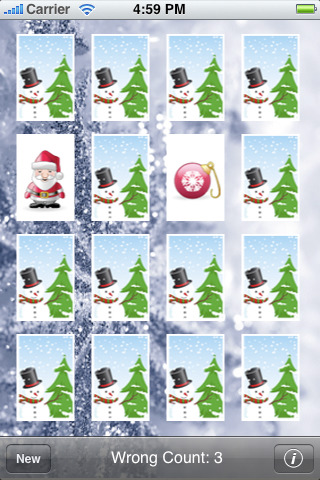
Wormie has gotten pretty good at navigating herself around my menu's and found one of the apps I was lining up for her to test on her own. The Christmas Card Match game was a free seasonal app similar to the Halloween matching game i reviewed in October. Wormie started it up and played a few games before making her way back to Santa's Cookies which I reviewed two weeks ago. The Christmas Card Match really wasn't in the spirit of Christmas cards but it was 1. free and 2. very Christmassy. My only complaint were the sounds were a little too "Space Invaders" for me so I guess the a publisher couldn't get his hands on any seasonal bells or something. That said I don't think Wormie minded too much since she played it for a good 5 minutes before moving on. All said and done I was impressed that Wormie made her way back to Santa's Cookies and proceeded to use the app for the rest of a car ride to day care which was another 10 minutes. I might have underestimated Santa's cookies!

Age Range: 3-5
Difficulty: 3/5 (5 being easy)
Look & Feel : 3/5 (5 being cool)
Parent Helper: 3/5 (5 being helpful)

Wednesday, December 9, 2009

SantasCookies is Free But Not to Filling!

It is very likely that Christmas will kill me and while I am using iPhone to track present shopping I really was hoping for some cool Christmas applications. My “Free App Review Week” didn’t work out quite as I planned (house remodel, work crisis) I figured free Christmas apps was my next target.

I searched high and low and first decent free Christmas app I could download was called SantaCookies. The idea is cute; you decorate cookies to be left for Santa. The start function is straight forward; you just touch the screen and are in the app. At first I had some trouble figuring out that to decorate the cookies you had to press the cookie decorations in the bottom navigation. The tricky part was that the decorations would appear in the middle of the four cookies to be decorated, when I was looking to drag it up to the spot I wanted to place it. I showed Wormie and she got it right away. Her bad habits had not been trained like mine.

Wormie spent a good 15 minutes playing with the app the first time I gave it to her. After her initial session she never spent much time with the application again. There were additional little features like you can leave a note for Santa and save the cookies you decorated to your photo album but those were not of any interest to Wormie. Overall I would rate this as a good free download with some seasonal appeal but in the larger scheme of things it will get deleted shortly after the holidays.


Age Range: 3-5
Difficulty: 3/5 (5 being easy)
Look & Feel : 3/5 (5 being cool)
Parent Helper: 2/5 (5 being helpful)

Price:Free

Tuesday, December 1, 2009

Peekaboo Barn - A Solid "Lite" Small Child App

I picked up Peekaboo Barn based on a recommendation from a friend who said her daughters were really into it. I went for the free version and got Wormie started right away. The start button was easy for her to figure out and the game play was well done. Here's a quick run down. Open to a barn scene. Barn shakes, touch doors, reveal animal, animal makes noise, door closes, repeat.

As per all "Lite" apps there are only a few animals to cycle through where in the full fledged app there are a supposedly a bunch more. I swear i read someplace there is a night time barn party scene. That sounds a little too Cinimax for me, but that could be a mis-read. Wormie liked the app, but it was a little too young for her. I'd peg this for 2-3 year olds since the game play is simple and tight. In addition the limited number of animals made it a pretty quick play session.

Age Range: 2-3
Difficulty: 4/5 (5 being easy)
Look & Feel : 4/5 (5 being cool)
Parent Helper: 2/5 (5 being helpful)

Price:Free

Tuesday, November 24, 2009

The Free App Conundrum: Shape Builder - Lite Version

So i take a rather loose interpretation of iTunes App store lists of the top Free or Paid Apps. I'm sure the algorithm that determines what ends up in the "Top" lists is so complicated that they have an army of mathlete optical laser engineers who work on it. However - I hope that a good dose of fun gets worked into the equation somehow. Wormie and I try to tease out the fun strings from the messy App Store algorithm when we are testing applications. I mix up the free and paid applications we review, but given this is cyberweek i'm going to try and do a free app a day during down time at work. Here's the catch...i'm going to do a "Lite" review.

In general a lot of the free applications that are appropriate for kids are limited in functionality and are designed as free trials with the goal of upselling you to their paid version. Shape Builder Lite is a puzzle application that was high up in the Free Education Apps section of the iPhone App store. This fit my criteria of peceived value and the right price.

The premise is simple - you get an outline of a puzzle and the missing pieces. You then drag pieces into the corresponding spot on the outlined shape and build your object. Once it is complete the object forms into a picture and makes a sound. I make a puzzle guitar, the puzzle turns into a guitar, the guitar then plays a little ditty.

Wormie grasped the basics right out of the gate. She could start the app on her own and quickly started trying to drop the pieces into the relevant spots. The challenge, and my only complaint about this application, is that the game play of dragging pieces was a little off. Wormie and her four year old fingers wanted to direct the puzzle piecec by holding it right in the middle. It was much more effective by dragging the lower right corner of each piece and dropping that slighly past where the puzzle ended. That was an impossible concept to explain, but after a few frustrating tries she seemed to get it down well enough to complete a puzzle with limited cries for "Daddy." After several days she had the game play down cold and did not need any help.

Wormie likes it. I don't think there is any educational value to forming the letters or objects but she likes it and i think is a fun brain teaser. I am tempted to get the full paid version since she cycles through all the free puzzles (5-10) quickly.

Age Range: 3.5+
Difficulty: 3/5 (5 being easy)
Look & Feel : 25 (5 being cool)
Parent Helper: 3/5 (5 being helpful)

Price:Free

Wednesday, November 18, 2009

ABC Tracer: First Step in Making My Girl a Genius

As previously mentioned Wormie has become extremely interested in reading her books. So much so that she will pass watching TV or a movie after dinner so she can pour over her library books. After the success of the iPhone kid book app i figured i would try something more educational. My first experiment with educational flash cards didn't go so well. I'm giving that app some time before writing the review but it left a bad taste in my mouth.

My method for picking my apps for review is not very complex. I usually use the app store on the phone and will try a mix of paid and free versions to keep it balanced. I found the ABC Tracer in the Education channel in the iPhone store. My assumption there is that the best selling or most popular will be the versions that Apple puts at the top of the list. It's not a complex equation but I figure its worthwhile to work through the top apps first before digging down into the weeds.

So... i found ABC Tracer to figure out the basics before handing over to Wormie. This apps got everything for type A parents.
  • Flashcards? CHECK!
  • Phonics? CHECK?
  • Freestyle drawing to express your innner Picasso? DOUBLE CHECK!
The basic gist is that you can trace letters (upper case/lower case) and numbers in order to practice you writing skills. There are other little features like you can change the color of your ink and sound features (phonics i guess) like touching an object associated with your letter, which will then make the appropriate sound. Trace an A, touch the alligator, alligator roars... Wormie nailed it.

Like i said last week the iPhone book was in Wormies top spot, until she found ABC Tracer. I showed her how to start the app and she started cranking away on the tracings. I thought that i would have to show her how to work the menu but she was comfortable navigating all on her own. She even discovered some features i had missed, like a free drawing component that was probably designed for letters, but she used for pictures. Wormie went through each letter and number all on her own and would then go back to the beginning to start over.

The look and feel reminded me of a Fisher Price toy a la 1983, but the functionality is so strong, and Wormie was so engaged that I can forgive the lack luster aesthetics. Aside from dated artwork the only other criticism i have is that the app is trying to teach a "right" and "wrong" way to write a letter. I'm sure there is some theory and method behind this but for hte life of me i couldn't figure it out or see a way to explain the "correct" way to write a letter to Wormie. Perhaps I am just a roadblock on her way to a James Joycean understanding of the printed word, but I think she will be just as smart if i don't let her know that the red lines in her tracing means she did something wrong. Regardless this was not a blocker for using the application and Wormie has continued to bang the heck out of the ABC Tracer. I would highly recommend this to parents whose children are just getting into reading and letters.

Age Range: 4.5+
Difficulty: 4/5 (5 being easy)
Look & Feel :1/5 (5 being cool)
Parent Helper: 5/5 (5 being helpful)

Price:$1.99

Sunday, November 15, 2009

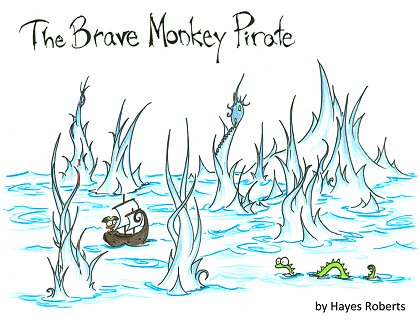
iStoryTime: The Brave Monkey Pirate - Quirky, Quick - PERFECT!

I saw a post not long ago on Twitter from App Develop @iStorytime promoting their kids story application. I thought it was a great idea and posted something about it to @gabbaphone twitter account. @iStoryTime wrote me back and gave me a free promo code to check out one of their story apps. I felt a little weird reviewing a free game, i'm all about the journalistic impartiality don't you know, so I went ahead and bought one for $1.99. I went for 'The Brave Monkey Pirate" based on the funny title and cute art.

I checked it out myself before handing it over to Wormie and there were some controls for audio (ie. do you want a childs voice or adult voice) and some other basic set up controls. It was nothing you need to do before using the App with your child but i was curious at how robust the reader controls were - the answer is, not very. I went through the story myself and found it a quirky and cute. Its about a little monkey who takes a magical (read trippy) journeym and along the way he finds a way to make trips to the doctor visit less scary. The minimalist art is cute and cool, and the little parable going on about being brave when you go to the doctor is light enough that it does not come off as a "Oh my go could Berenstein Bears be less subtle" life lesson. A subsequent search turned the book up on Scribd and the Robert Hayes, the authors, site http://www.bluebison.net/. My only complaint about the application was that i wish the page turning functioned more like the Kindle application - but this item really had no impact on the 20 something page iBook.

I gave the App to Wormie thinking it would be a short trial. For what ever reason i figured she would get bored quickly and ask for a different game. I was SO wrong. Wormie is just starting to get into writing letters and has been pouring over books from the library. I can only assume that this new found interest in the written word helped spur her obsession with "The Brave Monkey Pirate." When I handed Wormie the App she figured out the page scrolling right away. She also liked the audio feature, which i know because when i turned it off after another viewing, she complained how the App was broken. When she got to the end of the story, she rewound all the pages and started over. She read and re-read the story for a full 10-20 minutes, which must have been about 10 reads of the story. The "pirate story" as she called it, has became the top requested app on my phone until I downloaded some letter tracing apps.

Overall - i was surprised, and pleased, at how much she really liked it. I believe the combination of quality art, cute story, professional audio, and her new found interest in "reading" sealed the deal. My only complaint is that at $1.99, for what is a considerably short story, this is an expensive proposition. However, if I broke down how much i've paid on a per viewing basis, I'm sure its beat most of the childrens books we buy at our LBS, Kepplers, at about $.10 a view and going down! I have been meaning to buy another story for some time to see how much is the form vs. content but until then Wormie still likes to log a few reads of "The Brave Monkey Pirate" while we wait for our breakfast every Sunday.


Age Range: 3-5
Difficulty: 3/5 (5 being easy)
Look & Feel :4/5 (5 being cool)
Parent Helper: 5/5 (5 being helpful)